Cheap and reliable: check out these sturdy laptops

HP 15-F222WM 15.6-inch

The HP 15-F222WM replaces the 2015 HP 15-F211WM in HP’s line-up of affordable laptops. Priced under $300, the HP 15-F222WM is best suited for home or office use. While its Intel Pentium N3540 processor and 4GB of RAM will easily cope with tasks such as Skype, Internet browsing and sending emails, it is slightly underpowered for more intensive tasks. You might want to consider either an Intel i3 or an Intel i5 based laptop if you intend on working with more intensive apps. Like its predecessor, you get the same 500GB mechanical hard drive which offers a decent amount storage space. However, the entry-level hard drive will mean slower Windows boot speeds and your apps will take a bit longer to load. You will be able to upgrade the hard drive to an SSD, however these are still expensive for the amount of storage space that they offer. One of the key features of the HP 15-F222WM is the touchscreen display. Despite the laptop’s low price, the touchscreen is fairly responsive and this will allow you to easily navigate around Windows or your favorite web browser. However, the HP 15-F222WM still features the same budget display panel which offers a maximum resolution of 1366 x 768 and average viewing angles. While the display does not offer Full-HD resolution, it will still allow you to stream your favorite series or movies in 720p quality. A minor drawback is that the HP 15-F222WM does not feature Bluetooth connectivity. While this is not a train smash, it would have been nice for HP to include it in there updated laptop.

Intel Pentium N3540 2.16GHz [View Benchmarks]

Intel HD Graphics (Bay Trail) Shared [View Framerates]

4GB DDR3L RAM

500GB 5400 RPM HDD

15.6 inch, 1366 x 768 pixels (TN)

Windows 10 Home

5.5 hours battery life

5.05 lbs

Pros

Affordable price

Touchscreen display

Decent amount of storage

Good build quality

Cons

Slightly underpowered

Average keyboard

Poor webcam quality

No 5GHz WiFi connectivity

No Bluetooth

Summary

The HP 15-F222WM is a budget friendly laptop for home or office use. However, if you are looking for a more powerful machine that does more than basic tasks, then this laptop is not right for you.

ASUS VivoBook X540SA BPD0602V 15.6-inch

While most budget 15.6-inch laptops weigh in at over 5 pounds, the ASUS VivoBook X540SA is noticeably lighter and weighs in at just 4.41 pounds. Its sturdy plastic construction is quite rugged and will easily withstand being carried around on a daily basis. The battery life is also a lot better than some of its competitors and some users have reported run times of over 7 hours off of a full charge. Realistically you can look at 5-6 hours of web browsing or word processing and 3-4 hours while streaming videos. Powered by an Intel Quad Core Pentium N3700 processor and 4GB of RAM, the ASUS VivoBook X540SSA will easily cope with basic tasks at home or at the office. But the installed 4GB of RAM is soldered to the mainboard and you will only be able to install another 4GB RAM module. But 8GB of RAM is more than sufficient for the needs of most basic apps and for the limitations of the Pentium processor. The 500GB mechanical hard drive offers a decent amount of space to store your files and your installed apps, but it is a slower 5400rpm drive. You can upgrade to a faster drive, but it is not necessary for this budget friendly laptop. You get a standard 1366 x 768 display, which offers great image quality, but the viewing angles are not as good as IPS displays. The display offers impressive image quality for video playback and you can comfortably stream videos at 720p. The superfast USB 3.1 Type-C port allows you to connect to a host of next generation devices and peripherals, which helps in future proofing the ASUS VivoBook X540SA.

Intel Pentium N3700 1.60GHz [View Benchmarks]

Intel HD Graphics (Braswell) Shared [View Framerates]

4GB DDR3L RAM

500GB 5400 RPM HDD

15.6 inch, 1366 x 768 pixels (TN)

Windows 10 Home

6 hours battery life

4.41 lbs

Pros

Price

USB 3.1 Type-C

Decent battery life

Light

Cons

4GB of onboard RAM can’t be removed

Slightly underpowered processor

Slight keyboard and display flex

Only two full size USB ports

Summary

The ASUS VivoBook X540SA offers great value for money and even features a USB 3.1 Type-C port. But the Intel Pentium processor is slightly underpowered for more intensive multitasking and you only receive two full size USB ports.

#cheaplaptops #cheaptechnology #computers
Is the expensive screen replacement worth it?

Repairing a damaged device may be costly. The repairing costs may be close to the costs of purchasing a new device. However, it depends heavily on the type of damage and the part to be repaired. This kind of expensive fixes is not very common, according to a wide variety of regular users.

A cracked smartphone screen can ruin your day, and if you don’t have the right repair options it could ruin your month.

Replacing an iPhone or Android in the middle of a contract or a payment plan is expensive, and with trade-in offers there is less chance that you have a spare phone to rely on.

We’ll walk through the options you can use to fix your broken iPhone screen or broken Android screen. There are a variety of ways you can fix your broken screen and options to look for help.

If you drop your iPhone or Android without a case you may end up looking for a solution. Cases can help, but the odds are good that if you are reading this you are looking for a solution for a screen you already cracked.

#screenrepairs #expensivetechnologyrepair #wirelesstechnology

5 reasons to keep your landline phone

About two out of five Indian households have disconnected their home phones and rely solely on cell service to stay in touch with the world. If you’re thinking of joining the mobile-only movement, though, you might want to reconsider: Here are five reasons to stick with a home phone, whether it’s a landline (traditional copper-wire connection) or VoIP (voice over Internet protocol) service from your cable company.

1. A home phone sounds better than a cell phone

In our tests, voice quality for talking and listening on a cordless home phone was generally better than that of the best cell phones—important if you suffer from hearing loss, your household is noisy, or you spend a lot of time on the phone, especially in a home office.

2. A home phone offers enhanced security

Cell phones use a GPS-based method to report your location in a 911 emergency. That’s fine when you’re on the road, but if you live in a high-rise building, it won’t indicate which floor you’re on. A home phone is connected to your address, including the apartment number, so the 911 operator knows exactly where to send help even if you can’t talk.

Also, a phone with a corded base can work during a power outage, as long as it’s connected to a conventional landline or VoIP service with battery backup.

Another advantage: Home-­security systems generally require a home phone connection to monitor fire- and burglar-alarm sensors. If you don’t have one, certain alarm companies will install a special device that communicates with their office via a cellular connection, but that will cost extra.

3. You might not save much when you drop home-phone service

Dropping a phone line from a triple-play telecom bundle might save you as little as $5 or so a month. That’s because the discount for an Internet and TV double play is usually less than for a triple play with phone service. In a recent survey, about 40 percent of Consumer Reports readers who thought about switching telecom services kept the phone as part of a bundle because of the skimpy savings.

4. A home phone can improve your cell reception

Some new cordless phones can stand in for your cell phone. By placing a cell phone near the cordless phone’s base, you can access your wireless service using Bluetooth technology and use a cordless handset to make or take cell calls. In addition to the convenience of using one handset for all of your calls, you might get better cell-phone reception at home. For example, if you don’t get cell service in your basement, you might be able to make or take cell calls from there using a cordless handset.

5. New cordless phones are better than old models

If you’re less than impressed with your old cordless phone, maybe it’s just time for an upgrade. New models have lots of convenience features, like big, soft-touch buttons, easy-to-read displays, and backlighting that’s great in a dim room. Talking caller ID announces the caller’s name or number, so you don’t have to find a phone to see who’s calling. A voice mail indicator lights up when there’s a message on phone company voice mail. A built-in answering machine is handy for screening calls.

DECT (Digital Enhanced Cordless Telecommunications) technology provides loud, crystal clear sound with nary a crackle, with little if any interference from devices such as ­microwave ovens, which use other frequencies. DECT phones also tend to have relatively long talk times, so you won’t run out of juice in the middle of ordering takeout. Some models support up to 12 handsets from one base, and handsets can be used as close-range walkie-talkies in large houses..

#landline #technology #wirelesstechnology

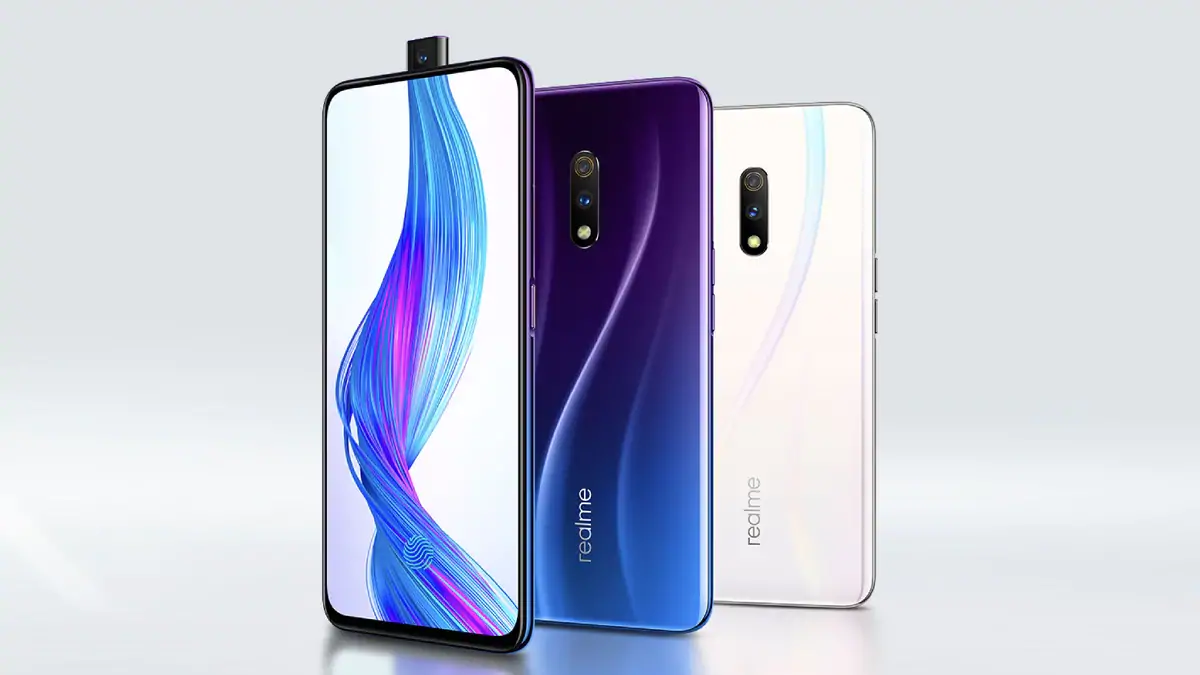
Realme X

Realme X

Specifications

  • 4 GB RAM | 128 GB ROM |
  • 16.59 cm (6.53 inch) FHD+ Display
  • 48MP + 5MP | 16MP Front Camera
  • 3765 mAh Battery
  • Qualcomm Snapdragon 710 Octa Core 2.2 GHz AIE Processor
  • VooC Flash Charge 3.0
  • In-display Fingerprint Sensor
  • Super AMOLED Display

Design a site like this with WordPress.com
Get started